

Reviews Callbacks Industries Pricing Contact Book a demo Start free trial Login

Review automation for florists

More florist reviews, with a thoughtful request after the flowers arrive.

A bouquet, a collection and wedding flowers have different customer journeys. Choose the right person and moment to ask, then use a short branded message and eligible automatic reminders to make honest feedback part of your routine.

No setup fee. Verify your email, choose a plan and add a card to start your trial.

Use Reviews on its own. No callback widget needed.

Example FloristText message
Hi Alex, thank you for choosing Example Florist. We’d love to hear about your experience with us. Please share your honest feedback when you have a moment.Share your experience ↗
Illustrative customer request

Ask at a moment that makes sense.

For everyday orders, ask after confirmed delivery or collection and time to experience the result. For event flowers, choose a considered point after the occasion rather than the delivery morning.

Ask the purchaser or the recipient?

Start with the person who placed the order and experienced your service. A gift recipient may not expect contact from you, and a delivery number is not automatically a review-request contact. Do not send the same request to both by default.
After delivery or collection

Wait until delivery or collection is complete and the purchaser has had a chance to hear how it went. Ask about the overall experience rather than assuming the flowers arrived successfully as soon as the order left the shop.

Wedding and sensitive occasion work

Give an event customer time after the occasion before asking. For sympathy flowers, agree a considerate contact approach with your team rather than putting every order into the same immediate follow-up routine.

How to ask your customers for florist reviews.

Start with a personal, neutral message. Replace the example business name and choose the destination before sending.

  1. Choose the momentYour team decides the customer is ready to be asked.
  2. Choose the destinationSend them directly to a review site or to your RoundRobin feedback page.
  3. Keep the outcome clearA request, a link click and a published review are different events.
Explore the full Reviews walkthrough →

Suggested request

Hi Alex, thank you for choosing Example Florist. We’d love to hear about your experience with us. Please share your honest feedback when you have a moment.

A gentle reminder

Hi Alex, if you’d still like to share feedback about your experience with Example Florist, here’s the link again. Thank you for your time.

Invite honest feedback without suggesting a rating. No messages are sent from this example.

Fit it around your working day.

  1. Agree the contact and request moment for delivery, collection and event orders.
  2. Add ready purchasers in the dashboard or a connected Google Sheet; order completion in a shop system needs an explicit workflow.
  3. Choose your review destination, check sending limits and welcome honest feedback without asking for a particular rating.

Keep the handover clear

Your order system does not automatically tell RoundRobin when flowers arrive. You decide who is ready to be asked. The sample reminder is suggested wording; automatic follow-up follows the product’s timing and eligibility rules.

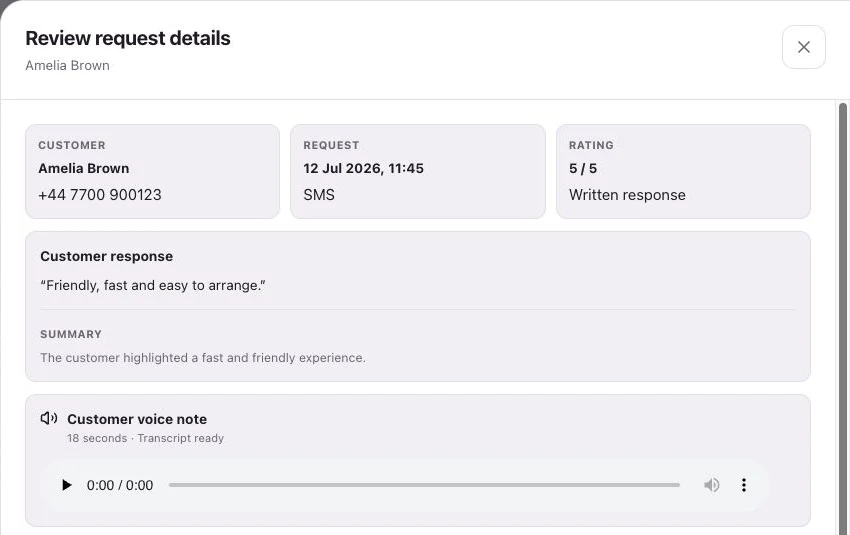
Reviews request details showing customer feedback
Product interface with example data.

See request history, feedback and review-site clicks separately.

A few useful answers.

How do I ask customers for reviews without sounding pushy?

Use a short message with your shop name, thank them and invite honest feedback through one clear link. Avoid asking for five stars or offering a reward. The sample request and reminder above keep the choice with the customer.

Should a small florist ask after every order?

Use a consistent process, but check the request history for repeat customers. Choose a considered cadence instead of repeatedly asking someone who orders flowers every week.

When do review reminders stop?

Eligible unfinished requests receive automatic follow-up. For direct review links, reminders stop after a click; the click does not confirm that a Google or other public review was published.

What happens after a review request?

Customers follow your chosen link to Google, Trustpilot or another configured destination, or leave feedback on your branded RoundRobin page. They choose their own rating and words. RoundRobin feedback is never automatically posted to another platform.

What can we measure?

Track the request history, review-site clicks and feedback received in RoundRobin. A click to a public review site does not confirm a published review. For direct links, reminders stop after a click; eligibility and timing rules apply.

Start with your next review request.

Set up Reviews, choose your destination and send an individual request. Add automation when your routine is ready.

No setup fee. Email verification, plan selection and a payment card start your trial. Initial review-request SMS messages accepted for sending use credits from your plan. See Pricing for current rules.

Want website visitors to reach your team too?Callbacks for florists →