

Reviews Callbacks Industries Pricing Contact Book a demo Start free trial Login

Review automation for accountants

More client reviews for your accountancy firm.

A completed set of accounts, a clear explanation or a smooth onboarding can give a client something useful to say. Make asking part of your client routine, with branded requests and follow-up that fit around ongoing relationships.

No setup fee. Verify your email, choose a plan and add a card to start your trial.

Use Reviews on its own. No callback widget needed.

Example AccountantsText message
Hi Alex, thank you for working with Example Accountants. We’d appreciate your honest feedback on your experience with our team.Share your experience ↗
Illustrative customer request

Ask at a moment that makes sense.

Ask after a completed piece of work or an agreed relationship review, once the client has had time to experience the service. Add the client manually or to your connected Sheet at that point.

After a completed engagement

Choose a point after the client has received the work and had an opportunity to discuss it. A year-end review or completed return can be a useful milestone; sending a document alone does not tell you whether the experience is finished.
For ongoing clients

Pick a considered relationship milestone, such as the first reporting period or an annual service review. Keep one agreed request moment in your process so bookkeeping clients are not asked after every routine contact.

When a new client settles in

Ask about the onboarding experience once access, handover and the first agreed work are complete. Keep the message about your service, without including financial details or making the outcome of the work part of the request.

A request you can make your own.

Start with a personal, neutral message. Replace the example business name and choose the destination before sending.

  1. Choose the momentYour team decides the customer is ready to be asked.
  2. Choose the destinationSend them directly to a review site or to your RoundRobin feedback page.
  3. Keep the outcome clearA request, a link click and a published review are different events.
Explore the full Reviews walkthrough →

Suggested request

Hi Alex, thank you for working with Example Accountants. We’d appreciate your honest feedback on your experience with our team.

Invite honest feedback without suggesting a rating. No messages are sent from this example.

Fit it around your working day.

  1. Choose one request milestone for each type of engagement and agree who checks that it is complete.
  2. Send your first request from the dashboard, or add ready clients to a Google Sheet and map their name and contact columns.
  3. Choose a direct review link or your branded feedback page, then check sending limits and the request history before adding ongoing clients again.

Keep the handover clear

Completing work in your accounting software does not itself send a request. Your team or a connected workflow must add the client, and review messages should not contain confidential financial information.

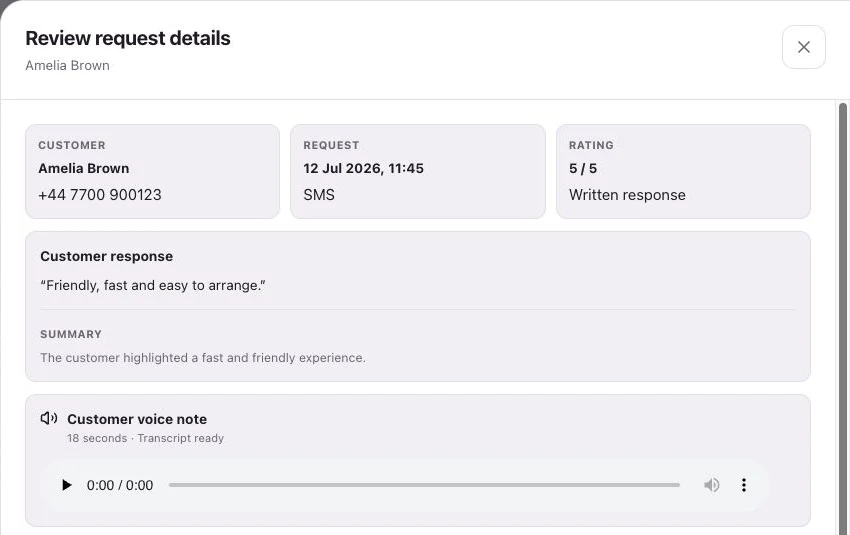
Reviews request details showing customer feedback
Product interface with example data.

See request history, feedback and review-site clicks separately.

A few useful answers.

Should we ask after every set of monthly accounts?

Choose a sensible cadence for the relationship rather than asking after every recurring task. Agree a milestone, review the request history and add clients when they are ready.

Can clients leave feedback without writing a public Google review?

Yes. Choose your branded RoundRobin feedback page for written feedback and an optional voice note. Public review links remain available regardless of the rating; a response is not automatically posted to Google.

Will this connect to our practice management software automatically?

The supported starting points are individual dashboard requests and a connected Google Sheet. A practice system needs a workflow that puts ready clients into that process; a completed task is not an automatic trigger on its own.

What happens after a review request?

Customers follow your chosen link to Google, Trustpilot or another configured destination, or leave feedback on your branded RoundRobin page. They choose their own rating and words. RoundRobin feedback is never automatically posted to another platform.

What can we measure?

Track the request history, review-site clicks and feedback received in RoundRobin. A click to a public review site does not confirm a published review. For direct links, reminders stop after a click; eligibility and timing rules apply.

Start with your next review request.

Set up Reviews, choose your destination and send an individual request. Add automation when your routine is ready.

No setup fee. Email verification, plan selection and a payment card start your trial. Initial review-request SMS messages accepted for sending use credits from your plan. See Pricing for current rules.

Want website visitors to reach your team too?Callbacks for accountants →