Reviews Callbacks Industries Pricing Contact Book a demo Start free trial Login

Website callbacks for marketing agencies

Turn agency website enquiries into useful first conversations.

A prospect reading about your services may have questions that a long form cannot answer. Offer a callback alongside your existing enquiry route, with new-business cover, routing and available later slots that fit around client delivery.

No setup fee. Verify your email, choose a plan and add a card to start your trial.

Your team accepts first. Then we call the customer.

Example Agency

A conversation starts here.

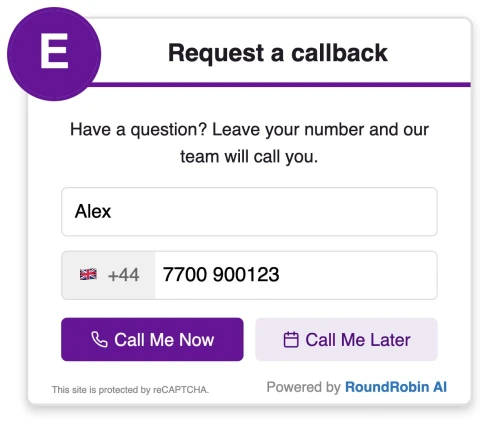
RoundRobin callback widget with a name field, country code, phone number and options to call now or later
Illustrative website example

Make room for the right conversation.

Offer immediate calls during new-business cover. Use enabled scheduling or schedule-only for periods when the team is delivering client work or in meetings.

Interest on a service page

Add a callback invitation beside a relevant service or case study. Use the first conversation to understand the prospect’s aims, scope and timing; the widget does not qualify budget or choose a service specialist automatically.
New business around client delivery

Configure a first group for staff covering enquiries, then a backup group if appropriate. If founders handle the calls between meetings, available scheduled slots can set a more realistic expectation than an always-on invitation.

Understand the next action

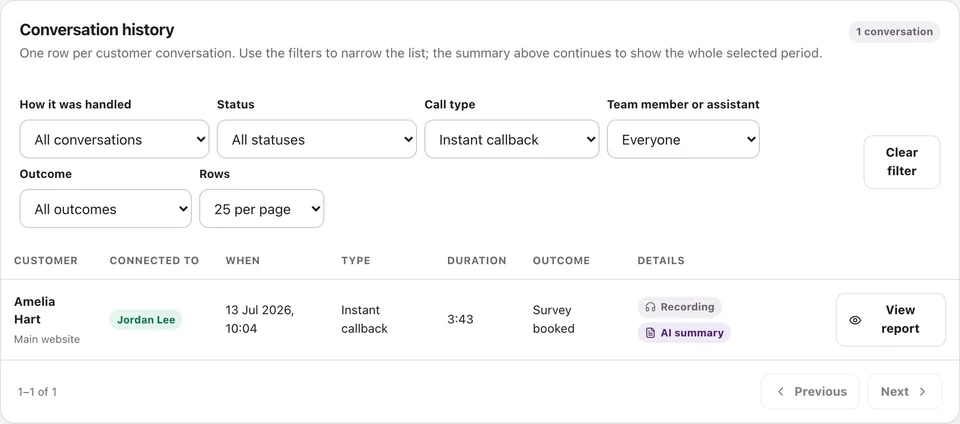
Use the call history to see whether the conversation connected and who accepted it. Available recordings and summaries can support a handover, while your team decides the proposal, discovery session or follow-up task.

A clear invitation to talk.

Tell visitors what the conversation is for. Use wording that matches the enquiries your team is ready to handle.

  1. The visitor requests a callThey leave their details, or choose an available later slot when scheduling is enabled.
  2. Your team acceptsConfigured recipients are called according to your routing and availability.
  3. The conversation beginsOnce a team member accepts, the customer is called. Your team agrees the next step with them.
Explore the full Callback walkthrough →

Suggested widget wording

Want to discuss a project? Leave your number and our team will call to find out what you have in mind.

Example wording for your business. This preview does not place calls or take bookings.

Fit it around your working day.

  1. Choose the service and contact pages where a short conversation is a useful next step.
  2. Set a new-business group, appropriate backup recipients and hours someone can actually cover.
  3. Test an immediate and, if enabled, scheduled request; agree who checks unconnected requests in the dashboard.

Set the right expectation

A callback is not a qualified opportunity or a booked discovery meeting. Your team establishes fit, updates the CRM and agrees the next step.

Calls dashboard showing callback activity and follow-up
Product interface with example data.

Review call activity and available recordings, transcripts and summaries.

A few useful answers.

Can we keep our existing enquiry form?

Yes. The callback widget can be another contact option alongside your form. Form-triggered calling is a separate Relay workflow; installing the widget does not connect your form automatically.

Will it route a PPC enquiry to our PPC specialist automatically?

The widget calls your configured recipients using your routing settings. Do not assume it identifies the requested service from a visitor’s intent. Your first contact can establish the requirement and arrange a specialist follow-up.

What should we measure beyond the number of requests?

Check connected and unconnected outcomes in the call history, then compare those conversations with the opportunities your team records. A callback request alone does not establish a qualified lead or sale.

Who is called first?

RoundRobin calls your configured team first. A team member must accept before the customer is called. Connection depends on availability and both parties answering; an instant request does not guarantee an immediate conversation.

Can visitors request a later call?

Yes, when scheduling is enabled and available slots are configured. Operating hours, recipient availability and your settings determine the options. Requesting a callback does not by itself confirm a service appointment.

Make your next enquiry a conversation.

Set your recipients, check availability and try the callback workflow before adding it to your website.

No setup fee. Email verification, plan selection and a payment card start your trial. Calls use credits at the applicable rates. See Pricing for current rules.

Want to make asking for reviews part of the routine?Reviews for marketing agencies →